Page 1 of 2
Cannot get this to automate -stumped.
Posted: Mon Jul 24, 2017 7:54 pm
by lalalandsynth
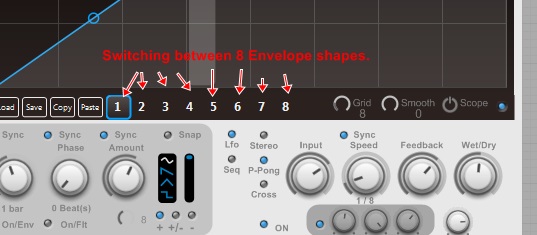
I am trying to automate the state selector for this advance envelope - switching between the 8 presets.
It is set to rec to and automate from host , shows up as a parameter in Reaper, but will not automate when I apply a curve and I cannot see why ?
Can anyone have a look at this and see if they spot the problem ?
The VST param for the state selector can be found in the save/load - 1-8 preset bar.
At some point in my fiddling with this I got it to respond but its some time ago, and now I cant remember what I did.
Feel like it should work like this ?
Thanks for your time.
Re: Cannot get this to automate -stumped.
Posted: Mon Jul 24, 2017 10:00 pm
by TheOm
It seems to me like Automation Recording has to be turned off for host automation to work.
I also nomalized the values for the preset prim (I think preset values must be between 0 and 1).
Re: Cannot get this to automate -stumped.
Posted: Mon Jul 24, 2017 10:57 pm
by lalalandsynth
Did you upload the correct file ? I cannot see any changes?
When you say normalize the values , what do you use for that ?
Re: Cannot get this to automate -stumped.
Posted: Tue Jul 25, 2017 12:28 am
by TheOm
Yeah sorry that was the wrong file, changed it now
Re: Cannot get this to automate -stumped.
Posted: Tue Jul 25, 2017 12:39 am
by lalalandsynth
Thanks ! This works

I wonder why it cannot be automated from the GUI itself -Rec ?
And why enabling rec -disables the automation ?
Re: Cannot get this to automate -stumped.
Posted: Tue Jul 25, 2017 8:15 am
by Spogg
Automation means the DAW can control the knob.
Rec means you can record knob movements from the FS VST GUI into the DAW.
Normally both are set to True, so you can record a knob’s movement and, in playback, the knob will move and the parameters will change.
It doesn’t even need to be a preset so if you de-select Preset you can still manipulate the parameters in the DAW. Of course the naming must still be unique in the project and this configuration is unlikely to be of practical use in my view.
You can test this and if not correct please report back with a simple demo.
As per the Component Reference all preset parameters must be in the range 0-1. I once tested this and the parameters will store large float values BUT you lose accuracy when re-loading the presets. Also, I’m not sure that DAWs will correctly handle values outside of the 0-1 range for automation. I never checked this out.
Cheers
Spogg
Re: Cannot get this to automate -stumped.
Posted: Tue Jul 25, 2017 1:28 pm
by lalalandsynth
I must test this issue regarding the 0-1 into the preset so I understand it properly , thanks for the explanation Spogg.
The weird part here is that the automation stops working for this particular parameter once it is set to rec as well as receive automation.
Re: Cannot get this to automate -stumped.
Posted: Tue Jul 25, 2017 2:40 pm
by tulamide
There isn't much to test. It simply is a VST requirement. The VST SDK builds upon values always being in the range 0-1. If they're off, they're in an undefined state and it depends on the various products how they deal with out-of-spec VST formats.
Re: Cannot get this to automate -stumped.
Posted: Tue Jul 25, 2017 3:07 pm
by Spogg
lalalandsynth wrote:The weird part here is that the automation stops working for this particular parameter once it is set to rec as well as receive automation.
What type of parameter is it? What does it control or descibe?
It would help us if you can distil the parameter into a simple test schematic...
Cheers
Spogg
Re: Cannot get this to automate -stumped.
Posted: Tue Jul 25, 2017 6:57 pm
by lalalandsynth
I meant "test" as in implement it and understand how it is "normalized" , I have not encountered this before where I need to automate a 1-8 state or where I am switching between 8 values. I guess I somehow figured that the preset module would "convert" any values at the input into a float representative and "ignore" input values.
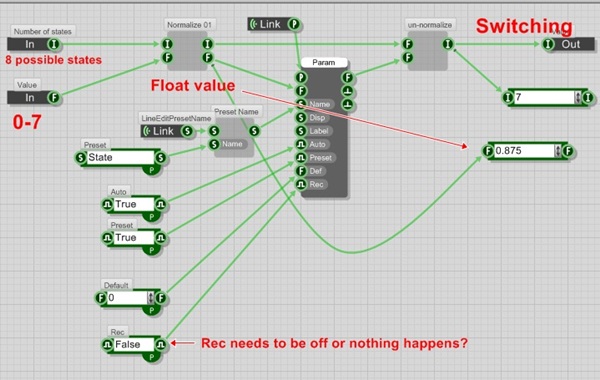
Problem number 1,
I am switching between 8 envelope shapes , using integers from 0-7.
This needed to be "normalized" or converted to float between 0-1.
- rec 2.jpg (39.2 KiB) Viewed 29072 times
Om's solution was to "normalize" the values to get float value to represent 0-7
This however requires the Rec to be disabled or it does not work to automate it.
Other then that this worked for the example posted which is just the basic advanced envelope , except that it has been changed to 8 possible shapes rather then 4.
- Rec.jpg (80.36 KiB) Viewed 29072 times
Problem number 2 .
When I implement Om's solution into my plugin , Reaper goes apshit&grinds to a halt when I try and automate this, it does "work" as in it will change the envelope selection - When I automate in a step manner it does switch properly but when I use a linear curve ..it slows Reaper down to a halt when the playcursor passes through automation values?
Difference from example posted is that in my plugin I have 3 advanced envelopes.
I might have done something wrong , going over this .
"If they're off, they're in an undefined state and it depends on the various products how they deal with out-of-spec VST formats." There is probably something like that happening here in problem 2, although it seems to be set up correctly?
I will make a simpler example but If you want to check either my initial example posted*which did not work for obvious reasons) or Om's solution then the preset module for the switching is in here.
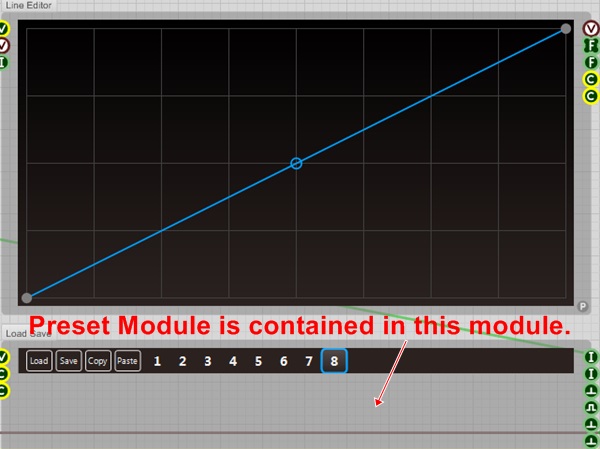
- rec 3.jpg (63.65 KiB) Viewed 29072 times