Page 1 of 2
Volume shaper /Line editor causing extra harmonics, noise ?
Posted: Thu Jun 29, 2017 5:07 pm
by lalalandsynth
I am using this volume shaper/line editor that I found somewhere .
At this point I am using it for volume only , similar to LFO tool.
For some reason when I send a sine wave through it for testing when the envelope rises or falls it creates this raspy sound , adding harmonics , noise. I tried adding some smoothing/de zipper on the output of the envelope and yes it does help but at the same time it smoothes the envelopes. What I would like to achieve is a noise free envelope and use the smoothing for effect or to fix clicks.
Any thoughts ?
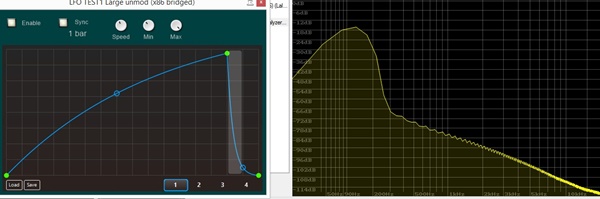
- lfo test 2.jpg (41.47 KiB) Viewed 29683 times
Project posted in subsequent post.
Re: Volume shaper /Line editor causing extra harmonics, nois
Posted: Thu Jun 29, 2017 5:33 pm
by adamszabo
the problem will be in the stream code not the envelope editor, you should post the full project with the problem, perhaps we can help you better then.
Re: Volume shaper /Line editor causing extra harmonics, nois
Posted: Thu Jun 29, 2017 5:41 pm
by Spogg
I don't know any Ruby but this is creating a 385 element float array. How are you using this array?
Since this is in green and generated by Ruby it may well be that the timing is too slow and inaccurate or it has insuffcient steps leading to quantisation artefacts. It depends on how you're using it. It won't be fast enough to modulate audio in real time.
If you could upload what you have, to show the problem better, it would be easier to check what's happening.
Cheers
Spogg
Re: Volume shaper /Line editor causing extra harmonics, nois
Posted: Thu Jun 29, 2017 6:34 pm
by lalalandsynth
Here is the project, both the 3.09 beta which I am working in and also the 3.08 save.
It makes sense that its too slow or has insufficient steps as I am am also getting pretty jagged CC output.
If I could speed this up, I should be golden...for now

Any thoughts on how I can increase the resolution to be able to work with audio ?
@Spogg , yes , its coming from a float array and into a float array to poly.
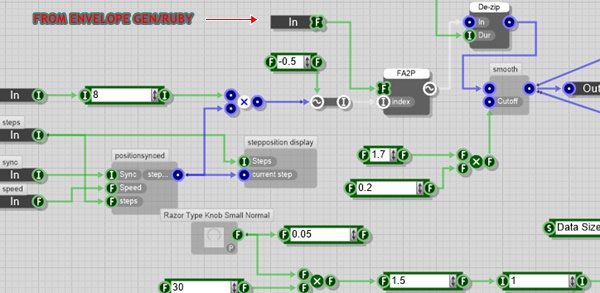
- float.jpg (71.74 KiB) Viewed 29673 times
There is also an error where you have to right click the editor for the envelope to appear , works ok as a vst.
Re: Volume shaper /Line editor causing extra harmonics, nois
Posted: Thu Jun 29, 2017 9:30 pm
by TheOm
You should be using some kind of interpolation to read values from the array. Linear interpolation should be fine.
Re: Volume shaper /Line editor causing extra harmonics, nois
Posted: Thu Jun 29, 2017 9:48 pm
by lalalandsynth
TheOm wrote:You should be using some kind of interpolation to read values from the array. Linear interpolation should be fine.
This is better ,I think , I can still hear the "zipping noise" when the attack is fast on the envelope .
Does not even need to be that fast , starts to sound a like a bit crusher , kind of.
You should hear it on all 4 presets in this project (the one you uploaded with different presets)
Re: Volume shaper /Line editor causing extra harmonics, nois
Posted: Thu Jun 29, 2017 10:39 pm
by lalalandsynth
This is how it measures with the interpolation, still some obvious artifacts.
I can hear less artifacts then before though, so that is progress....I think?
Not a very fast envelope 1/2 bars
Disabled, Sine played through.
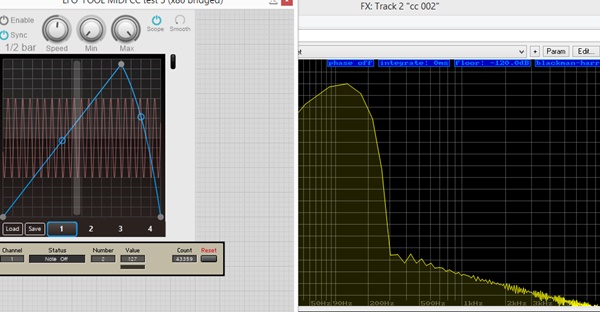
- Clean sine.jpg (67.33 KiB) Viewed 29665 times
Enabled , Sine plus artifacts.
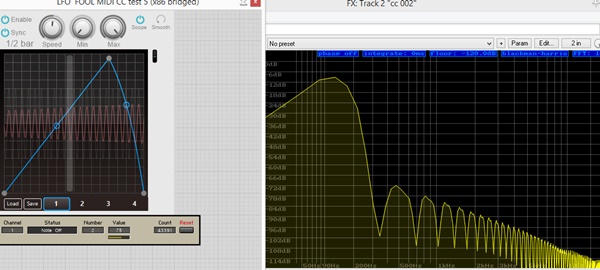
- dirty sine.jpg (63.21 KiB) Viewed 29665 times
And still some pretty low resolution CC output, I am assuming that is the same issue.? It even looks a bit worse.
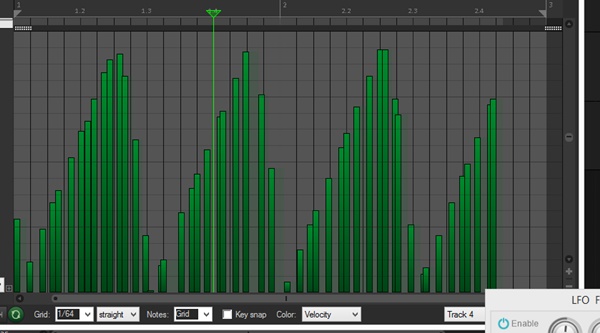
- cc.jpg (62.3 KiB) Viewed 29665 times
Re: Volume shaper /Line editor causing extra harmonics, nois
Posted: Thu Jun 29, 2017 11:11 pm
by lalalandsynth
For some reason it sounds a bit better after the interpolation changes , (edit, after listening , it sounds far better, but still has artifacts) but it seems to be lower resolution , at least for the cc output ? Pre interpolation is much better for the cc ouput as far as i can tell, but still not good enough , should be much higher resolution and denser.
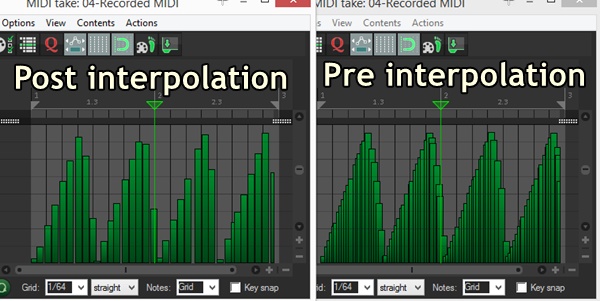
- interpolation cc.jpg (78.86 KiB) Viewed 29663 times
Also the audio looks cleaner before the interpolation, although I can clearly hear artifacts on both.
Before Interpolation - Sine - 1/2 Bar.
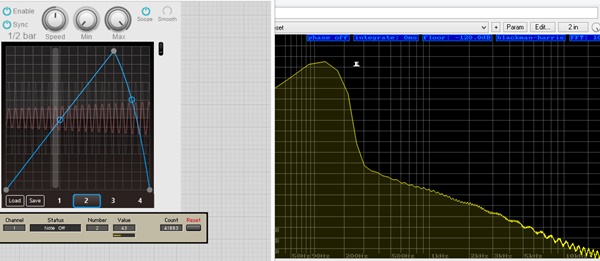
- Dirty sine before interpolation.jpg (58.16 KiB) Viewed 29663 times
After Interpolation - Sine - 1/2 bar.
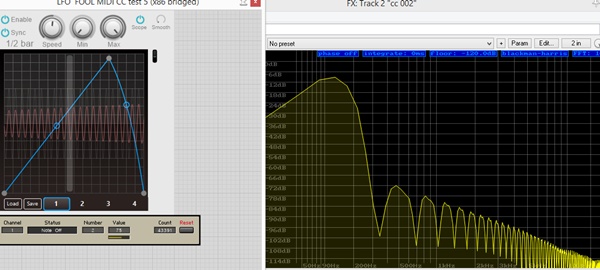
- dirty sine.jpg (63.21 KiB) Viewed 29663 times
Not convinced that did the trick, can I increase the resolution of the interpolation or is there something else I can do ?
Re: Volume shaper /Line editor causing extra harmonics, nois
Posted: Fri Jun 30, 2017 7:57 am
by Spogg
Thanks for getting the chance to have a look at this!
All you need to do now is get rid of the de-zipper from the interpolated version.
I've found that this prim doesn't work as expected if placed inline with a stream; you get crap. It's meant for de-zipping float to stream connections only, mainly for knobs.
Cheers
Spogg
Re: Volume shaper /Line editor causing extra harmonics, nois
Posted: Fri Jun 30, 2017 10:39 am
by lalalandsynth
Sweet , will try that now !
I will have to find a way to soften the envelopes or do something to get rid of clicks when processing low frequency waveforms, the de-zipper worked great for that

EDIT: TEsting in FS now , seems perfect - now onto testing in reaper with a spectrogram and analyser.
RE-Edit- Softening of the envelope is possible via the smoothing filter , so that is solved.
Thanks @theom !
Still seem to have a problem with low resolution CC output .
I did a comparison with LFO tool , and it outputs hi res /dense CC.
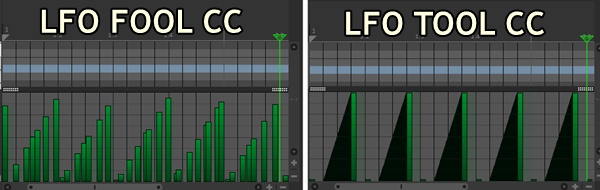
- LFo tool fool.jpg (45.92 KiB) Viewed 29637 times
I do have to rescale the Midi CC , if I plug it into the envelope output it will output zero to max as 63-127.
So I plug it into a rescaler to make it go from 0 to 127
I wonder if the rescaling affects the resolution, although I doubt it ?
Do I need more ticks then 100 to achieve higher resolution ?
I am having a hard time finding any modules/synths in my library to see how this is done.
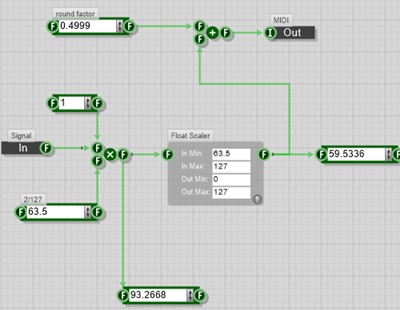
- midi cc 2.jpg (40.59 KiB) Viewed 29637 times
Project Attached.