Newbie Project Template (v.3.0.6)
Posted: Tue Feb 09, 2021 1:08 am
Updated: 02/09/21
Newbie Project Template
FlowStone v.3.0.6
A simple, basic FlowStone FSM Template (Filename: tstfsm.fsm)
for building and testing a project.
Download Link:
https://www.inventorefx.com/_ifxfstone/tstfsm.zip
Large View:
https://www.inventorefx.com/_ifxfstone/tstfsm.jpg
NOTE: Using the Frequency Analyzer with Impulse Trigger out to project input requires the "stream pins" (right click in/out pins and select round white "~" as type).
TO USE:
First disconnect project input/output pins from any other devices.
Connect the Impulse Out to project input and project output to Frequency Analyzer Input to use.
Using the "stream pins" type will disable MIDI (red pin type) and Audio (blue pin type) input/output.
TO RESET PROJECT:
Disconnect the Frequency Analyzer and reset/reconnect any/all changed pin types to 'Default' pin types to restore MIDI/Audio project settings.
Newbie Project Template
FlowStone v.3.0.6
A simple, basic FlowStone FSM Template (Filename: tstfsm.fsm)
for building and testing a project.
Download Link:
https://www.inventorefx.com/_ifxfstone/tstfsm.zip
Large View:
https://www.inventorefx.com/_ifxfstone/tstfsm.jpg
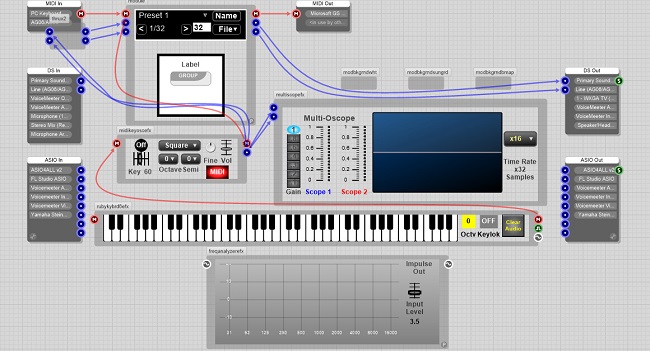
NOTE: Using the Frequency Analyzer with Impulse Trigger out to project input requires the "stream pins" (right click in/out pins and select round white "~" as type).
TO USE:
First disconnect project input/output pins from any other devices.
Connect the Impulse Out to project input and project output to Frequency Analyzer Input to use.
Using the "stream pins" type will disable MIDI (red pin type) and Audio (blue pin type) input/output.
TO RESET PROJECT:
Disconnect the Frequency Analyzer and reset/reconnect any/all changed pin types to 'Default' pin types to restore MIDI/Audio project settings.