Page 1 of 3
Why I'm not able to stay in sync with DAW using stream/blue?
Posted: Wed Feb 24, 2016 5:09 pm
by Nowhk
I'm testing a sort of "Sequencer" that need to work on the current step of my DAW/Hhost: FL Studio in my case.
I will vary Tempo BPM during the time, so the app need to be in sync with it:
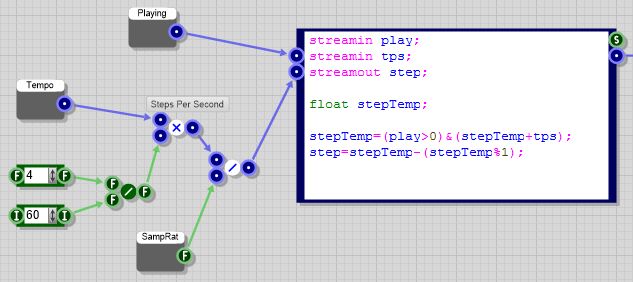
- Immagine.png (23.92 KiB) Viewed 26897 times
I'm working with "blu/mono" stream data type, but if you change Tempo BPM of FL Studio and you look at the Mono connector, you can clearly see that often steps (for example the first when the pattern retrig) is out of sync.
What's the problem here in your opinion?
Tempo prim between FL Studio and FlowStone it is not as fast on refresh?
Float rounding errors?
My wrong math on calculating step?
Note: I know Tick25 is not accurate to reading data from M2F, but even placing a PPQ prim (which is more accurate) change nothing. So it is not what I'm reading that is wrong I guess; its the whole step that arrive to Mono Readout that is already incorrect.
Re: Why I'm not able to stay in sync with DAW using stream/b
Posted: Wed Feb 24, 2016 5:28 pm
by Nubeat7
you cyn use ppq , so its always nailed to the actual position
i did a sync module for steplfo you also need to calculate different in fl studio then in other daw's which is really stupid sadly there is no chance to automaticly change the calculations for different daws, it needs to be done manually
in the sequence module you find the module position synced..
viewtopic.php?f=3&t=1001&p=2831&hilit=step+lfo#p2831
Re: Why I'm not able to stay in sync with DAW using stream/b
Posted: Wed Feb 24, 2016 7:35 pm
by RJHollins
Just following along and I noticed a PRIM I've never looked at. It's called:
EdOpe - it outs a BOOLEAN.
What does it mean 'when a VST editor is opened in a host' ???
I see nothing in the FS Component Reference manual BTW.
I know what a VST and a host are

but what does it mean by EDITOR

I've not seen a VST editor to even open ... now I'm intrigue that maybe this PRIM could help in specific situations I've needed ... don't know.
Thanks for any info or link to docs.
Re: Why I'm not able to stay in sync with DAW using stream/b
Posted: Wed Feb 24, 2016 7:39 pm
by Nowhk
Nubeat7 wrote:you cyn use ppq , so its always nailed to the actual position
i did a sync module for steplfo you also need to calculate different in fl studio then in other daw's which is really stupid sadly there is no chance to automaticly change the calculations for different daws, it needs to be done manually
in the sequence module you find the module position synced..
viewtopic.php?f=3&t=1001&p=2831&hilit=step+lfo#p2831
But PPQ it is not constant due to the BPM tempo change. I mean: if I change it, the PPQ won't resize accordly. It just sum actual values. For example: in a pattern of 4 beats, if first I slow down the tempo and than I pitch up, I can end with values > 4.
Yes it works if I don't change "live" BPM on the DAW (as mine works):
but when I move it, PPQ totally goes messy!
And anyway, I don't know Assembler unfortunatly

Re: Why I'm not able to stay in sync with DAW using stream/b
Posted: Wed Feb 24, 2016 8:27 pm
by adamszabo
RJHollins wrote:Thanks for any info or link to docs.
Its basically what it says. you export the vst, then you open the vst in your host to turn the knobs etc. When its open its true when its closed its false. You can use it to block certain things when the vst is closed like refreshing images and so on.
Re: Why I'm not able to stay in sync with DAW using stream/b
Posted: Wed Feb 24, 2016 9:00 pm
by RJHollins
perfect.
Thank-you for example.
[we return you to this regularly scheduled program].
Re: Why I'm not able to stay in sync with DAW using stream/b
Posted: Wed Feb 24, 2016 11:04 pm
by Nubeat7
Nowhk wrote:But PPQ it is not constant due to the BPM tempo change. I mean: if I change it, the PPQ won't resize accordly.
i don't know what you mean, ppq is pulses per quarter and should show always the actual playposition in pulses (or ticks) per quarter, so it has nothing to do with the speed at all it just shows the actual playposition in your song..
just tested it in cubase and works fine there, always nailed in sync, but sure, at fast tempochanges the play position jumps back ( at least in cubase, didn't test the reaction in other daws.. ) but still you always have the correct playposition to keep it synced to speed and position, it will be different when you want just temposync but no position sync, then the tempo prim is fine, the problem is that in most cases it will produce small rounding errors which results in running out of sync over the time, but this shouldn't be too bad for shorter play times or lfo's which always get restarted at noteon
the assembler code is not too hard, here is the basecode in dspcode..
Code: Select all
// code by Nubeat 7
streamin speed;
streamin stepst;
streamin beatcnt;
streamin PPQ;
streamout steppos;

steppos = ((PPQ*speed) % beatcnt)*steps;
Re: Why I'm not able to stay in sync with DAW using stream/b
Posted: Thu Feb 25, 2016 12:30 am
by nix
My guess is that both tempo and ppq prims work.
I will get my hands dirty on this one and check for us.
what about adding a restarted counter on tempo change to the on change number of samples?
I think something like that might need to happen
Re: Why I'm not able to stay in sync with DAW using stream/b
Posted: Thu Feb 25, 2016 6:27 am
by tulamide
Sorry to tune in, but this whole discussion was already done before, when PHI had a similar issue. It turned out that FL Studio ignores the VST Standards and outputs wrong values for ppq.
viewtopic.php?f=3&t=2732&p=14733&hilit=ppq#p14733
Re: Why I'm not able to stay in sync with DAW using stream/b
Posted: Thu Feb 25, 2016 9:54 am
by Nubeat7
tulamide wrote:Sorry to tune in, but this whole discussion was already done before, when PHI had a similar issue. It turned out that FL Studio ignores the VST Standards and outputs wrong values for ppq.
viewtopic.php?f=3&t=2732&p=14733&hilit=ppq#p14733
yes, also the difference between tempo sync and "positionsync" using the ppq is described there..
also with the fact that fl studio calculates the ppq differently when changing the timesignature from 4/4 it should stay in sync with the correct calculation, (there is already a flag in my calculation module for fl studio)
but yeah maybe its an fl issue again, wouldn't be exceptional..
you should compare the behaviour with other daw's