Page 1 of 3
The better Multi-Osc
Posted: Tue Jun 23, 2015 9:04 pm
by tulamide
I recently noticed that people still tend to grab the stock Multi-Osc from the toolbox, when prototyping. But Martin made some awesome replacements that are 10x less cpu demanding while having a more precise output.
Just so that you understand it right: Where you can use one stock oscillator, you can use up to
ten of MV's oscillators!
They came in a set of individual modules. The stock Multi-Osc module is a bit more convenient. So I made the very same module with Martin's oscillators. To easier see the difference in the toolbox, I also refined the graphics to have a more modern look.
Please, add it to your toolbox and use it instead, whenever you want to grab the stock module

Re: The better Multi-Osc
Posted: Tue Jun 23, 2015 11:14 pm
by Perfect Human Interface
Cool. Why not toss in the other oscillators for good measure?
I notice you set TextRenderingHint to '7'. To my knowledge, only values 0-5 are valid. Is that intentional? I think 5 (cleartype) reads much better.
Re: The better Multi-Osc
Posted: Wed Jun 24, 2015 12:16 am
by KG_is_back
Martin also made noise generators with superior value distribution. Frequency may be used as a seed.
Re: The better Multi-Osc
Posted: Wed Jun 24, 2015 6:13 pm
by tulamide
KG_is_back wrote:Martin also made noise generators with superior value distribution. Frequency may be used as a seed.
Of course! How could I forget about the noise osc? I even have it categorized in my toolbox!

It's implemented now!
Perfect Human Interface wrote:Cool. Why not toss in the other oscillators for good measure?
I notice you set TextRenderingHint to '7'. To my knowledge, only values 0-5 are valid. Is that intentional? I think 5 (cleartype) reads much better.
Thanks! Corrected TextRenderingHint. It was indeed meant to be 5. But I know where it comes from. For the color mixer I was using the little arrow for the spectrum and gradient displays, passed by id - which is 7

There's only one additional non-noise osc: Parabola. It's implemented now.
For download, see first post.
Re: The better Multi-Osc
Posted: Mon Jun 29, 2015 6:43 pm
by aronb
Hi,
I really like these oscillators !!!
I am in the process of adding non-BW-limited outputs to the assembly code versions...
My setup is using them in quadrature, but I have noticed something when using these oscillators, the phase seems to drift...
For example if I set the phase of 2 oscillators to 0.00 and 0.25, initially everything is fine, but after a minute or so the phase drifts. It matters to me only because I want to use these oscillators for drawing a circle or other complex shapes, and if the phase drifts the "Spiro-graph" (for lack of a better term) also drifts and the image is not symmetric anymore. I have been using Flowstone (and Synthmaker) for the past few years drawing shapes and patterns in laser (think o-scope).
Here are some images of the issue and the FSM file. I am using 3.0.5 Amber.
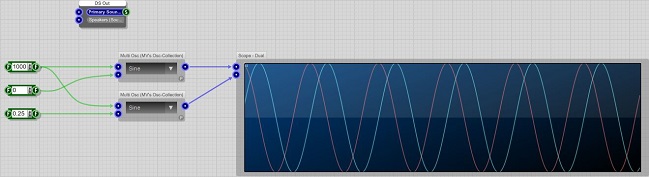
- Proper / Initial Phase Angle
- Initial_Phase.jpg (45.15 KiB) Viewed 33057 times
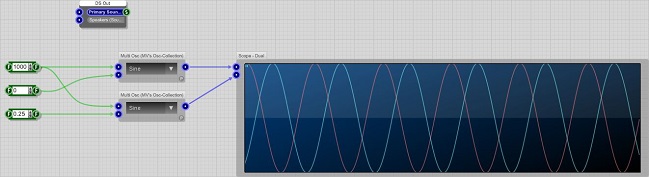
- Then Goes Out of Phase (approx. 1min)
- Goes_Out_of_Phase.jpg (44.53 KiB) Viewed 33057 times
Here is the FSM file as well...
Possibly a numeric precision issue when calculating the phase and or frequency(?)
Thanks for any insight into this or hopefully a fix,
Aron
Re: The better Multi-Osc
Posted: Mon Jun 29, 2015 7:31 pm
by KG_is_back
Yes, I see where's the problem:
Note, this is the code version of what's happening under the hood in assembly.
Code: Select all
//calculate ramp:

ramp=ramp+ phase + freq*0.5 ;
ramp2= ramp % 1; //this is for float numbers - the remainder may (and is) a fractional - not integer.
ramp=ramp2-phase;

out=sin1(ramp2);
Notice, when "ramp" is of several orders smaller than phase it looses precision when "ramp=ramp+phase" and later "ramp= ramp - phase". This is often use in denormal protectors, to round very small values to zero (basically rounds the value to certain number of decimal digits), but in this case it does harm, because when ramp is very small (and increments in very small steps = LFO) it gets rounded by different amounts depending on size of "phase".
FIX:
Code: Select all
//calculate ramp:

ramp=ramp+  (phase-Pphase) + freq*0.5 ;
ramp= ramp % 1; //this is for float numbers - the remainder may (and is) a fractional - not integer.


out=sin1(ramp);
Pphase=phase;
This will add the differential of phase to the ramp ( = when phase changes, the ramp changes by that change). Martin if you're reading this, please update your osc schematics.
Re: The better Multi-Osc
Posted: Mon Jun 29, 2015 9:43 pm
by tulamide
KG_is_back wrote:Martin if you're reading this, please update your osc schematics.
No need to. Martin once published "MVsLFOs.fsm", with 5 waveforms, plus 4 random lfos. He even made it into a "multi-lfo" module. I just don't remember the source link.
EDIT: here's the link,
http://www.dsprobotics.com/support/viewtopic.php?f=3&t=2871&p=15664
Re: The better Multi-Osc
Posted: Mon Jun 29, 2015 10:35 pm
by aronb
Are these Band Width Limited ?
The previous oscillators had an option to use a non band width limited output, all you have to do is add the connector.
Thanks,
Aron
Re: The better Multi-Osc
Posted: Tue Jun 30, 2015 8:33 am
by martinvicanek
Thank you tulamide for integrating my stuff.
aronb wrote:My setup is using them in quadrature, but I have noticed something when using these oscillators, the phase seems to drift...
Correct, there is a phase drift due to floating point arithmetics. I have a fix using fixed ponit arithmetics but it will take a while to update all schematics. In the meantime, use the dedicated quadrature oscillator in my schematic at
download/file.php?id=3797 where the relative phase does not drift away from 90 degrees.
Re: The better Multi-Osc
Posted: Tue Jun 30, 2015 1:21 pm
by aronb
Martin,
Thank you for doing this, your work is incredible ! The assembly language make using many oscillators way better than the stock oscillators !
A quadrature oscillators (sine/cosine, tri/qtri, square/qsquare, ramp/qramp) AND multiple oscillators (same) with phase controllability are key to my image synthesizer.
I appreciate your efforts and will start posting back some of my work as soon as I get something worthy of this forums level of expertise !!!
Aron