Page 1 of 3
Identify DAW (check if FL Studio, etc.)
Posted: Tue Sep 16, 2014 12:12 am
by Perfect Human Interface
Here's a potential solution to check whether a plugin is loaded in FL Studio or any other DAW, or just return the DAW name.
Not certain if it works, so you'll have to help me out and test it, if you don't mind.
I'm banking on the idea that MIDI In Devices will always return the used DAW as the first device. If not, I think this should still work for identifying whether or not the plugin is loaded in FL at least.
Potential problems: I don't actually know what determines the order of the MIDI Devices. If it's something like the order in which they're installed in Windows, that will break this. But in that case you MAY be able to just check all devices for the DAW name or something of that nature.
Re: Identify DAW (check if FL Studio, etc.)
Posted: Tue Sep 16, 2014 1:22 am
by KG_is_back
Can you make that into a VSTi (.dll) that will write a DAW name? I'm probably stupid, but I can't seem to make it work in VST form... wanna check this in other daws
Re: Identify DAW (check if FL Studio, etc.)
Posted: Tue Sep 16, 2014 1:26 am
by Perfect Human Interface
KG_is_back wrote:Can you make that into a VSTi (.dll) that will write a DAW name? I'm probably stupid, but I can't seem to make it work in VST form... wanna check this in other daws
Unfortunately not. I don't have VST export license (still using the FL version of Flowstone), and I don't have any other DAWs either. So I'm relying on you guys here.
When you say you can't make it work, does it just output nothing? The MIDI In Devices prim should surely output something, right?
Oh perhaps you mean the export won't work at all? I haven't a clue.
Re: Identify DAW (check if FL Studio, etc.)
Posted: Tue Sep 16, 2014 2:07 am
by tulamide
Sorry to disappoint you. The midi in devices prim does not list the daw, since they are no midi in devices. That's why it won't work.
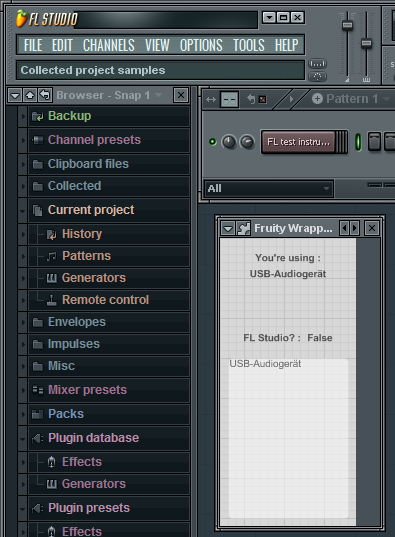
- Fl test.jpg (152.19 KiB) Viewed 29449 times
(USB-Audiogerät is my midi controller keyboard)
Re: Identify DAW (check if FL Studio, etc.)
Posted: Tue Sep 16, 2014 3:13 am
by Perfect Human Interface
tulamide wrote:Sorry to disappoint you. The midi in devices prim does not list the daw, since they are no midi in devices. That's why it won't work.
It doesn't list FL Studio in the string array at all (the text box inside the module)? It does on both of my machines.
Re: Identify DAW (check if FL Studio, etc.)
Posted: Tue Sep 16, 2014 3:22 am
by tulamide
Perfect Human Interface wrote:It doesn't list FL Studio in the string array at all (the text box inside the module)? It does on both of my machines.
Right, I added the text box to see if it is listed below the first entry. The FL version of Flowstone seems to be handled completely different. Kind of like a host inside the host, where the inside host is fed with midi in from the outer host. If that makes sense at all

Re: Identify DAW (check if FL Studio, etc.)
Posted: Tue Sep 16, 2014 3:29 am
by Perfect Human Interface
tulamide wrote:The FL version of Flowstone seems to be handled completely different. Kind of like a host inside the host, where the inside host is fed with midi in from the outer host. If that makes sense at all
Ohh I see. What a bummer!
Well if that's the case, how do you even get MIDI messages into a Flowstone plugin from FL in a VST export??
Re: Identify DAW (check if FL Studio, etc.)
Posted: Tue Sep 16, 2014 3:36 am
by tulamide
By sending a special structure called VSTMidiEvent. This structure is sent by the host, when the VST sends a wantEvents request.
Re: Identify DAW (check if FL Studio, etc.)
Posted: Tue Sep 16, 2014 3:49 am
by Perfect Human Interface
tulamide wrote:By sending a special structure called VSTMidiEvent. This structure is sent by the host, when the VST sends a wantEvents request.
Not intending to drag this off-topic (seems it was a failed attempt anyways), but I'm deep into a plugin project that requires MIDI input to an effect plugin. I need to know if I can still do that with a VST version export and not just with the FL export.
I had just use a "MIDI Out" plugin in FL, then in Flowstone pulled in MIDI data from FL Studio and filtered it with the MIDI port number. How can I take MIDI notes in with Flowstone if FL Studio isn't recognized as a MIDI in device?
Re: Identify DAW (check if FL Studio, etc.)
Posted: Tue Sep 16, 2014 4:09 am
by tulamide
Perfect Human Interface wrote:tulamide wrote:By sending a special structure called VSTMidiEvent. This structure is sent by the host, when the VST sends a wantEvents request.
Not intending to drag this off-topic (seems it was a failed attempt anyways), but I'm deep into a plugin project that requires MIDI input to an effect plugin. I need to know if I can still do that with a VST version export and not just with the FL export.
I had just use a "MIDI Out" plugin in FL, then in Flowstone pulled in MIDI data from FL Studio and filtered it with the MIDI port number. How can I take MIDI notes in with Flowstone if FL Studio isn't recognized as a MIDI in device?
I hope to give the correct answer, but I'm doing it just from my mind, so take it with care.
You don't need to access a device directly when exporting as VST, since you get midi data from the host. That's what Midi to Poly is for. Just give your module an input set to midi. If there's only one input and it's midi, then you can even export it as both, an instrument or an effect.
For exporting, a VSTi is defined by one midi input and two mono outputs. A VST effect can have any number of inputs and outputs (of all kinds), as long as the host can handle those.