Page 1 of 1
Help to a newbie
Posted: Tue Apr 29, 2014 10:47 am
by gonzogonzo
Hello to all,
i am a novice to Flowstone and at today i use it to interface my electronics circuit to a PC (usb, serial);
now i need to generate and send two different sound to pc speaker one to right channel and other one to left channel.
Can someone give me a simple example for this if is possible with Flowstone ?
And other i don't have understud what is ASIO and because is not usable in my PC...
Thanks in advance
Re: Help to a newbie
Posted: Tue Apr 29, 2014 11:29 am
by nix
Hi mate- welcome!
ASIO is a soundcard driver system, for high-end(pro) soundcards.
Since you don't have it,
you can use DirectSound.
The first 2 blue dots on the 'DS Out' object/dialog
are left and right.
The signal it wants is an audio stream.
It is somewhat an analog of a line level, although streaming at 44.1k.
You should always put a clipper in before 'DS Out',
this means the signal will not exceed 1 or -1
This range should always be followed in FS audio out signals(unless it doesn't come out of speakers).
I think that what you can do to succeed quickly,
is get the 'Example Synth' program,
and unhook either left or right, and play the synth.
This will give you an example to familiarise yourself with sending audio.
Cheers mate, ask any questions you have when they arise
Re: Help to a newbie
Posted: Tue Apr 29, 2014 1:24 pm
by gonzogonzo
Thanks Nix,
now can test what i need...
Re: Help to a newbie
Posted: Tue Apr 29, 2014 2:26 pm
by nix
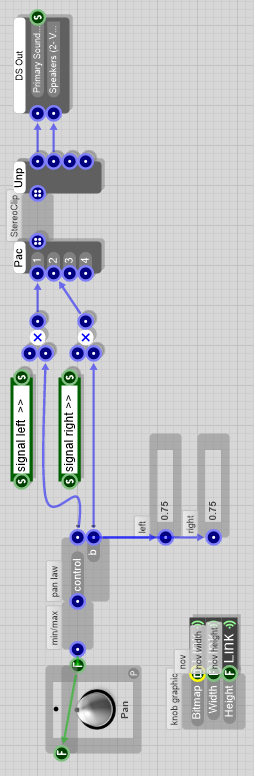
- panner_0.png (48.19 KiB) Viewed 10459 times
Cool.
Here is a pan knob, with a make-up pan law.
You could add it to the synth.
Plug the signal in where the ins are marked left and right with a string.
Cheers 8D
Re: Help to a newbie
Posted: Tue Apr 29, 2014 4:50 pm
by gonzogonzo
Thanks again Nix,
the last one is a bit hard for me but i study it....