Page 1 of 1
Change prim on knob output as a rule ?
Posted: Sat Apr 27, 2019 10:48 pm
by lalalandsynth
Does that sound reasonable to you guys ?
A knob set for 22 turns can easily output 80-100 triggers on a full turn , even more then that if you dont let go and keep moving the mouse, which can happen in use.
Having a change prim and it will only output the 21 triggers.
Re: Change prim on knob output as a rule ?
Posted: Sun Apr 28, 2019 12:43 am
by RJHollins
lalalandsynth wrote:Does that sound reasonable to you guys ?
A knob set for 22 turns can easily output 80-100 triggers on a full turn , even more then that if you dont let go and keep moving the mouse, which can happen in use.
Having a change prim and it will only output the 21 triggers.
I use that 'Change' PRIM everywhere I get multiple triggers ... including many KNOB instances.
Just be sure that the KNOB [or slider] still delivers values you need. If so ... should be good to go.
Re: Change prim on knob output as a rule ?
Posted: Sun Apr 28, 2019 2:22 am
by trogluddite
Oh yes, every time for me in that situation. Likewise, for bitmap animated knobs, I'll use a 'changed' somewhere at the end of the frame calculation so that there's no redraw trigger if the displayed animation frame stays the same. This can save a fair bit of graphics processing overhead, especially if redraw-rate limiting is used as well (for Ruby controls, these can usually be incorporated into the code.)
Re: Change prim on knob output as a rule ?
Posted: Sun Apr 28, 2019 5:08 am
by RJHollins
fewwph ... always good to get The Confirmation' whenever a 'rookie' suggests.
Thank-you !
In fact ... I think it was TROG who taught us this back in the SM daze.
Re: Change prim on knob output as a rule ?
Posted: Sun Apr 28, 2019 2:10 pm
by wlangfor@uoguelph.ca
just wait. I'll be making a new foundation which will replace the way knobs work. Should be impressive.
EDIT: link here:
http://dsprobotics.com/support/viewtopic.php?f=2&t=16405#p51712
Re: Change prim on knob output as a rule ?
Posted: Sun Apr 28, 2019 5:58 pm
by lalalandsynth
"I'll use a 'changed' somewhere at the end of the frame calculation so that there's no redraw trigger if the displayed animation frame stays the same. " Can you expand on this , not sure how to do that and I use almost exclusively bitmap knobs .
EDIT> I get it , indeed , lots of triggers there as well
Re: Change prim on knob output as a rule ?
Posted: Sun Apr 28, 2019 6:35 pm
by wlangfor@uoguelph.ca
lalalandsynth wrote:"I'll use a 'changed' somewhere at the end of the frame calculation so that there's no redraw trigger if the displayed animation frame stays the same. " Can you expand on this , not sure how to do that and I use almost exclusively bitmap knobs .
EDIT> I get it , indeed , lots of triggers there as well
As will I even in My new example. it's a great idea. Thanks for sharing

Re: Change prim on knob output as a rule ?
Posted: Thu Jul 16, 2020 12:48 pm
by lalalandsynth
Old thread but thought I would mention something I encountered.
If you have a change prim on the output of the knob then I am successful in reducing the trigger from the knob, so all good there.
But when I try and reduce the frame count by placing the change before the redraw then when I do Ctrl Click to to reset to Default value it will not send a trigger and therefore not reset the actual value, only the knob, visually .
Where would you place the change prim to reduce frame redraw ?
Any thoughts on this ?
Re: Change prim on knob output as a rule ?
Posted: Thu Jul 16, 2020 2:29 pm
by trogluddite
For the frame drawing, look for the point where the value gets rounded to integer (the frame number), then use the 'changed' on this integer (for confirmation - the next calculation is usually a multiplication by the frame width or height, which may or may not convert the value back to float).
Re: Change prim on knob output as a rule ?
Posted: Thu Jul 16, 2020 4:35 pm
by lalalandsynth
Here is my knob so what I would want to do is to limit the redraw triggers right? Where that trigger counter is.
Feels like i need to reduce the triggers somewhere before that right ?
I can put a change in front of that Step module and that works but will not update the value when I use Ctrl Click to reset the knob.
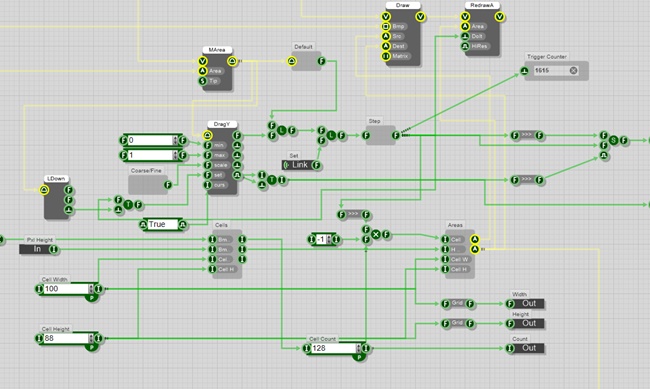
- Steps.jpg (93.33 KiB) Viewed 23169 times