Page 6 of 6
Re: Crashing on start-up [solved]
Posted: Sun Mar 17, 2013 11:31 am
by tester
If you have tool to follow what is installed where (files, registry entries), then you could exclude "bad installation issue". As far i remeber Ashampoo Uninstaller did such job, but I don't know whether it tracks everything when something was installed once (so it may require clean system on that). Anyway you would know exactly what folders, and what registry entries are to follow.
My second thoguth is, that some of FS related windows libraries might be broken, either due to some sort of update on other software (or system), or just crashed. Did you installed something else meanwhile?
Re: Crashing on start-up [solved]
Posted: Sun Mar 17, 2013 3:01 pm
by trogluddite
tester wrote:Did you installed something else meanwhile?
Certainly sound s something like that - too much of a coincidence that both machines went nuts at exactly the same time.
Makes me suspect an auto-update - either Windows, or anti-virus etc. stopping a file from being used/written because it thinks it's dangerous.
A guy I know from the Ruby forums over at Sketchup had just that problem - kept getting bug reports from users, and in the end, it turned out they were all using Kapersky anti-virus. It was quarantining his support files because the scanner was throwing false positives all the time - I've been using his graphics plugins for ages, and AVG never has a problem with them, but Kapersky never sort it out when he reports it.
Given that past problems always seem to involve support files, I wouldn't be surprised if it's something similar.
Re: Crashing on start-up [solved]
Posted: Sun Mar 17, 2013 3:53 pm
by tester
I remember, synthmaker apps were not welcome on my PC for some time. AVG was convinced that they are something bad (due to compression protocols), and simply blocked them.
Re: Crashing on start-up [solved]
Posted: Sun Mar 17, 2013 7:26 pm
by tester
Just came to my mind. When removing files - did you also removed the ruby dll file, that is being created in app data? I noticed, that no matter whether the projects use ruby modules or not - this dll file is created anyway, and it's not deleted when you quit the app (at least in exe version). Maybe some overwriting problem there?
Re: Crashing on start-up [solved]
Posted: Sun Mar 17, 2013 7:46 pm
by billv
tester wrote:Did you installed something else meanwhile
No. Last 4 weeks it's been nothing but FS, FL and Live for testing. Check e-mail. that's it.
trogluddite wrote:too much of a coincidence that both machines went nuts at exactly the same time.
That's why I'm pointing the finger at the Windows Update.......
tester wrote:did you also removed the ruby dll file, that is being created in app data?
No, I just deleted User modules in case I created i dodgy module..
Thanks guys. I 'll keep chipping away it for a while.
Hopefully Support will have a clue.
Re: Crashing on start-up [solved]
Posted: Mon Mar 18, 2013 7:54 am
by billv
Crashing on start-up PART 2 FIXEDBecause Part 2 is different to Part 1,ie: not directly related to ruby, it made sense
to try a basic
full un-install/reboot/re-install. It worked. And just like I thought too.....
I pulled all my fsm’s out from install folder.
Then pulled the “User” modules in “Application data” (docs & settings)
Un-installed FS.
Removed “Flowstone” folder from “Application data” (docs & settings)
Removed Ruby dll from windows/sys32
Removed DSP Pobotic Folders in Registry( 2 folders)
Re-booted.
FS Crashes on start-up.
I try again, and just like the laptop story, this time I get the “Safe start” option.
Once Inside I reset the start-up schematic to “Empty” and unchecked
“check for updates at start-up".
FS Works gain.
I then re-install fsm’s and user modules and is all good, except the minor issue
Of re-creating the user “tags”(which I didn’t think to keep).
FS still reads the name in the toolbox, so it was a five minute job to
Create my folder names again, and all good.
Well that was a nasty swim in the ocean. I'm back on board. Where's the coffee.....
Thanks for all the tips guys. Cheers.......

Re: Crashing on start-up [solved]
Posted: Wed May 08, 2013 9:39 am
by billv
@Support...
Just to note:
Last few weeks I've had a
trojan trying to access the web(keep getting the "hourglass" pointer),
and very often, have been getting similar popups like this.
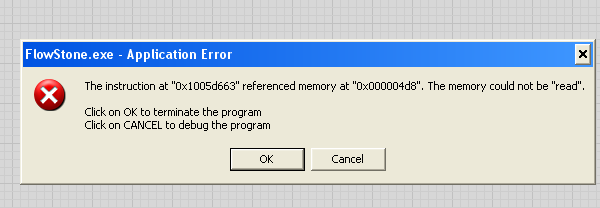
- ScreenShot071.png (12.64 KiB) Viewed 17416 times
But today it didn't read "Flowstone"...it read...
comsrvr.exe..no copy in win/sys/32.....it was in
app data...
Zone Alarm free picked it up along with 2 more
noopq.exe dxKKKK.exeback up and running clean now. stable at the moment.
Hope this helps.