Page 3 of 3
Re: Help Johan with Rompler expansion system
Posted: Wed Jun 03, 2020 2:49 pm
by wlangfor@uoguelph.ca
been working on this making a way of truncating ascii with commas to array to string and then re-writing with ruby so as to make an int with 8-12 digits or w/e that can de-compress to be something meaningful. It's a backwards way of doing the same thing but I think it has the best chance of success.
Re: Help Johan with Rompler expansion system
Posted: Thu Jun 18, 2020 1:37 pm
by Spogg
In case any of you were still thinking about this, or even working on it, I came up with a solution which Johan likes. It doesn’t address all of the features set out, but I don’t want anyone to do work which isn’t going to be used in the project. Of course, if anyone wants to offer more stuff, that would always be appreciated.
I made a system which can switch between the Start Library and Expansions which can be added to at any time. The Start Library is a fixed list of the wav file names in the Start Library folder. The names of the files are put into a string array which is stored in the plugin; baked in. The Start Library is always supplied and has to live alongside the VST plugin.
When you switch to Expansions you load a folder (not wavs). This is only possible in the FS4 alpha. The system then reads all the wav names in that folder and presents them to a selector system so you can run through the wavs in whatever Expansion folder you loaded. The search start location is from the VST plugin’s location, but you can navigate away and choose a different folder if you want. The path to the new wav file is stored in the preset but, importantly, it’s referenced by its name rather than by index number in the folder. This means you can add more wavs to any Expansion if you wish, and compile your favourites into your own folder.
The Rompler is supplied with a full bank of INIT presets. The settings chosen for INIT allow the auditioning of the sample clips which are all prepared ready for use. If you wish to modify the settings, for example to change the attack, filtering or FX etc, those settings can be saved as your own preset and will also be saved in the DAW song file. The saved preset will address the chosen wav by its name and path.
Johan seems to like it!
Cheers
Spogg
Re: Help Johan with Rompler expansion system
Posted: Thu Jun 18, 2020 3:02 pm
by tulamide
Spogg wrote:When you switch to Expansions you load a folder (not wavs). This is only possible in the FS4 alpha.
Gratulation on your system. Sounds like a good approach. However, the quote above is not true. You can do the same thing in 3.0.6 as well.
Re: Help Johan with Rompler expansion system
Posted: Fri Jun 19, 2020 8:11 am
by Spogg
tulamide wrote:Spogg wrote:When you switch to Expansions you load a folder (not wavs). This is only possible in the FS4 alpha.
... the quote above is not true. You can do the same thing in 3.0.6 as well.
Oh!

Then my toolbox is broken, because I looked for the load folder prim and it wasn't there! Oh dear...

Re: Help Johan with Rompler expansion system
Posted: Fri Jun 19, 2020 9:50 am
by tektoog
you can actually do that since SM...
If you don't specify what file to open with the find file prim... it loads the entire folder content, according to the file type you selected...

Re: Help Johan with Rompler expansion system
Posted: Wed Jun 24, 2020 1:35 pm
by Spogg
tulamide wrote:Spogg wrote:When you switch to Expansions you load a folder (not wavs). This is only possible in the FS4 alpha.
Gratulation on your system. Sounds like a good approach. However, the quote above is not true. You can do the same thing in 3.0.6 as well.
Well my toolbox was broken, so I fixed it from a backup.
However I still couldn’t find the Folder dialog prim. I also looked in SynthMaker and not there either.
So I’m still of the opinion that it’s new in FS4 (and wait to be shot down!).
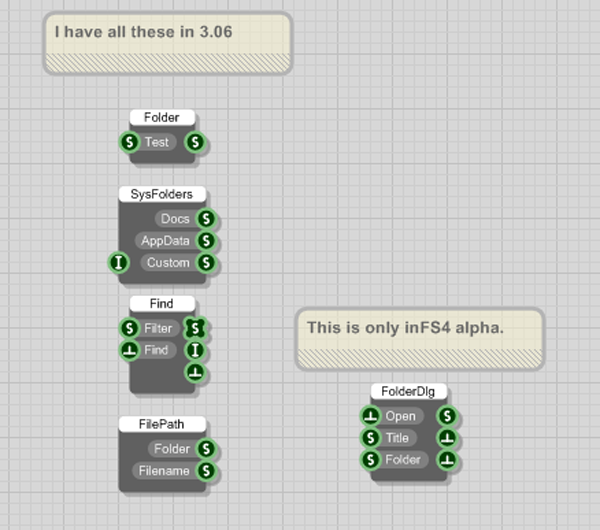
- Folder dialog FS4 only cropped .png (130.71 KiB) Viewed 16511 times
The attached schematic is made in
FS4 alpha and contains the prims above.
Re: Help Johan with Rompler expansion system
Posted: Wed Jun 24, 2020 1:54 pm
by tulamide
Spogg wrote:tulamide wrote:Spogg wrote:When you switch to Expansions you load a folder (not wavs). This is only possible in the FS4 alpha.
Gratulation on your system. Sounds like a good approach. However, the quote above is not true. You can do the same thing in 3.0.6 as well.
Well my toolbox was broken, so I fixed it from a backup.
However I still couldn’t find the Folder dialog prim. I also looked in SynthMaker and not there either.
So I’m still of the opinion that it’s new in FS4 (and wait to be shot down!).
Folder dialog FS4 only cropped .png
The attached schematic is made in
FS4 alpha and contains the prims above.
Oh, I see. Your quote was misleading then. "Doing it in green (without Ruby) is only possible in the alpha", is what I would agree to immediately. It is no big deal to load all files from a folder in Ruby. It is also no big deal to select a folder. You just don't have the system-provided folder dialog, but your own solution.