Page 3 of 4
Re: Default Directory locations
Posted: Sat May 28, 2016 6:20 am
by RJHollins
Thanks for help Jay. Just knowing this saves me additional grief trying to figure out.
Thanks!

Re: Default Directory locations
Posted: Sat May 28, 2016 6:28 am
by RJHollins
OK ... in the never ending quest

I could use some guidance/critique if this is a proper technique.
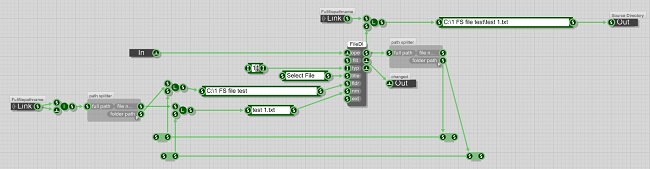
Here goes. In supplying SAVED file PATHS back into the FILEDIALOG prim ... like this:
- Screen-3.jpg (36.27 KiB) Viewed 18655 times
Is this the best way to get PATHS that is saved/loaded from a TXT file, back into the FileDialog to set a default ?
Obviously ... asking because this seems like it should work ... but it ain't really

Thanks for any help.
Here's the sample schematic:
Re: Default Directory locations
Posted: Wed Jun 01, 2016 3:35 am
by RJHollins
Gee ... not even a reply

Not even, 'that's the ugliest schematic ever seen !' .... just terrible ! .... nothing ?

Re: Default Directory locations
Posted: Thu Jun 02, 2016 5:51 am
by Tronic
Windows Registry can help on this case,
here an small example using the Registry class in Ruby,
I not have tested in an exported exe, so tell me if it work.
Code: Select all
# create un Registry instance
storeAppData = Registry.new

# create the KEY if not exist
# setKey method with true parameter create the KEY and return true on success
# setKey method with false can be used to check if the KEY exist and return true or false.

appKEY = "HKEY_CURRENT_USER\\SOFTWARE\\RJHollins\\APP_TEST"

until storeAppData.setKey(appKEY, false)
    storeAppData.setKey(appKEY, true)
end

registryName = "Last Open Path"
registryWriteValue = "C:\\directory"
# this write and read the REGISTRY, type can be: Bool, Int, Float, String
storeAppData.writeString(registryName, registryWriteValue)

registryReadValue = storeAppData.readString(registryName) # >> C:\\directory
Re: Default Directory locations
Posted: Thu Jun 02, 2016 6:33 am
by RJHollins
Hi Tronic.
I don't want to sound ungrateful, and already know You are way more experienced/knowledgeable in programming ...
But I'm hesitant to be writing into the REGISTRY. [even if that's whats happening when using some PRIMS and other FS functions]. Yeah ... you can say I'm chicken
Maybe there is no other way. I've tried many things [even with my limits], and nothing has worked consistently, and more times than not, my attempts just fail.
For some reason, the FileDialog PRIM just doesn't seem to use the 'default location' connector properly, or I'm doing something totally wrong in the sample schematic I posted above.
A solution I would prefer ... could this been done using RUBY ? Basically replacing the FileDialog PRIM with a RUBY routine ?
Again ... please don't take this wrong.
Re: Default Directory locations
Posted: Thu Jun 02, 2016 3:43 pm
by Tronic
Anyway,
to work with,
you have to save the file paths somewhere,
in your schematic you don't save the last used path to any file or in any REG in the registry,
and you have to reload back it when restart your app,
there is no magic that FS can do.
Re: Default Directory locations
Posted: Thu Jun 02, 2016 5:16 pm
by tulamide
Tronic wrote:Anyway,
to work with,
you have to save the file paths somewhere,
in your schematic you don't save the last used path to any file or in any REG in the registry,
and you have to reload back it when restart your app,
there is no magic that FS can do.
What Tronic said. And what I said 10 days ago:
tulamide wrote:RJHollins wrote:So specific ... the ONLY way is to Save to disk, and then AUTOLoad on startup ?
Yes.
That's how all the executables work, if they want to store settings that they want to use on the next start up. Mostly they use %APPDATA% for it.
No further comment.
Re: Default Directory locations
Posted: Thu Jun 02, 2016 5:32 pm
by RJHollins
Guys ... the schematic example was just that ...
The WIRELESS connectors are from a SAVE/LOAD module [very standard text file]. I just didn't include that to keep the post simple.
Re: Default Directory locations
Posted: Thu Jun 02, 2016 7:02 pm
by tulamide
Don't feel offended, RJ, but for me the whole page 3 doesn't make much sense.
You post a low res image of just a part of the whole system that works together. And when it comes to the point, where you would like to get some help you say: "It ain't really working."
That's nothing I would waste my time on.
(1) Post a schematic that clearly shows the issue(s)
(2) Describe in detail, what you expect that schematic to do, and what is not working correctly.
To the point, and with as much information as needed, then you might get more help.
Re: Default Directory locations
Posted: Thu Jun 02, 2016 9:27 pm
by Walter Sommerfeld
...only mention again like tulamide and i did before:
get rid of the loop back folder splitter (including the 4 nodes)
and it should work...!
1st trigger the ini load
2nd open file dialog
3rd if done save ini...
Keep on doing!