If you have a problem or need to report a bug please email : support@dsprobotics.com
There are 3 sections to this support area:
DOWNLOADS: access to product manuals, support files and drivers
HELP & INFORMATION: tutorials and example files for learning or finding pre-made modules for your projects
USER FORUMS: meet with other users and exchange ideas, you can also get help and assistance here
NEW REGISTRATIONS - please contact us if you wish to register on the forum
Users are reminded of the forum rules they sign up to which prohibits any activity that violates any laws including posting material covered by copyright
Custom Preset Manager
-
StereoSpace

- Posts: 78
- Joined: Sat Feb 21, 2015 12:59 am
 Custom Preset Manager
Hello!
Help please!
I can not guess to make the similar manager for the synthesizer.
Example: I have folders with separate presets how to make that on pushing a folder, the list of those presets was shown and at a choice the necessary booted? Forgive me for curve English)
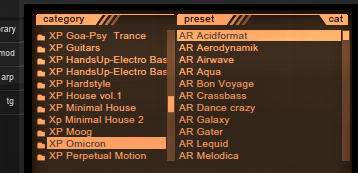
Help please!
I can not guess to make the similar manager for the synthesizer.
Example: I have folders with separate presets how to make that on pushing a folder, the list of those presets was shown and at a choice the necessary booted? Forgive me for curve English)
GUI designer
-
Freddymusic

- Posts: 30
- Joined: Mon Apr 16, 2007 4:57 pm
- Contact:
Re: Custom Preset Manager
You can find a lot of preset manager example on the synthmaker forum, but i think the sub-preset is not working perfectly.
freddymusic.hu

Re: Custom Preset Manager
if you are happy with the windows dropdown list you can use my grouped presets PM
http://flowstone.guru/downloads/grouped-presets/
if you want some fancy look like in your image you will need to build the GUI by yourselfwhich shouldn't be too hard, there are scrollable selectors out there in the forum (there was one just short time ago..just forgot who did it)
http://flowstone.guru/downloads/grouped-presets/
if you want some fancy look like in your image you will need to build the GUI by yourselfwhich shouldn't be too hard, there are scrollable selectors out there in the forum (there was one just short time ago..just forgot who did it)
-
StereoSpace
- Posts: 78
- Joined: Sat Feb 21, 2015 12:59 am
Re: Custom Preset Manager
Nubeat7 wrote:if you are happy with the windows dropdown list you can use my grouped presets PM
http://flowstone.guru/downloads/grouped-presets/
if you want some fancy look like in your image you will need to build the GUI by yourselfwhich shouldn't be too hard, there are scrollable selectors out there in the forum (there was one just short time ago..just forgot who did it)
Thank you very much! It just helps me to save a preset with the desired structure. Browser I did. after completion gooey lay out here ready-made solution.
GUI designer
Re: Custom Preset Manager
Hi guys,
I'm looking for a preset manager like the screen above from Nexus, and I've already got a similar thing, but I just can skip through the presets by clicking on them. In Nexus, you can also skip through the presets with pressing the "Key Up" and "Key Down" key. And scolling should be also available with the scrolling wheel and not only with clicking on the scroll bar. Has someone got an example for that a can give help to that problem?
If someone has got an fsm-file for such an browser manager that would be nice!
Best regards
I'm looking for a preset manager like the screen above from Nexus, and I've already got a similar thing, but I just can skip through the presets by clicking on them. In Nexus, you can also skip through the presets with pressing the "Key Up" and "Key Down" key. And scolling should be also available with the scrolling wheel and not only with clicking on the scroll bar. Has someone got an example for that a can give help to that problem?
If someone has got an fsm-file for such an browser manager that would be nice!
Best regards
Re: Custom Preset Manager
carlbeat wrote:Hi guys,
I'm looking for a preset manager like the screen above from Nexus, and I've already got a similar thing, but I just can skip through the presets by clicking on them. In Nexus, you can also skip through the presets with pressing the "Key Up" and "Key Down" key. And scolling should be also available with the scrolling wheel and not only with clicking on the scroll bar. Has someone got an example for that a can give help to that problem?
If someone has got an fsm-file for such an browser manager that would be nice!
Best regards
Flowstone doesn't support mouse wheel (it uses it for its own user interface) in projects. For the key detection you can use the "Is key pressed" prim. This should check regularly while the preset manager list is open. Find details about that prim in the component reference.
The same functionality is available in Ruby as well, if you prefer a Ruby solution.
"There lies the dog buried" (German saying translated literally)